AI agents built by
your team
Pick a template or describe the job. Connect the apps it needs. The agent runs on a schedule, a trigger or a Slack mention — and asks before anything risky.
Roll out specialized agents in minutes

What were our key metrics last week? I need a quick summary for the leadership sync.
Leadership needs the standard five KPIs in a hurry, so I'll work from the metrics sheet that holds our agreed definitions. That keeps the formulas consistent with the last few weekly briefs.

Reading sheets
Definitions look unchanged from last week. MRR and active users are best read straight from the warehouse rather than the cached sheet snapshot, so I'll grab those next.

Querying database
Usage and revenue numbers landed cleanly. Pipeline is the most volatile number so I'll pull it live from Salesforce instead of trusting the staging export.
Checking pipeline
Pipeline jumped nearly 40% — that's worth calling out explicitly with the two enterprise deals as the cause so leadership doesn't read it as noise.
Here is last week's KPI snapshot across your connected sources:
| Metric | This Week | Prior Week | Change |
|---|---|---|---|
| MRR | $482,300 | $471,100 | +2.4% |
| Active Users | 12,847 | 12,390 | +3.7% |
| Support Volume | 318 tickets | 402 tickets | -20.9% |
| NPS | 61 | 58 | +3 pts |
| Pipeline Created | $1.24M | $890K | +39.3% |
Pipeline created jumped nearly 40% driven by the Meridian and NovaTech enterprise deals entering discovery. Support volume dropped after the v4.2 patch resolved the SSO bug. Want me to format this as a Slack brief for #leadership?
Yes, post it to #leadership and flag the pipeline jump.
I'll format the brief in the same template leadership has been reading so the pipeline highlight stands out at the top, then attach the underlying records so anyone can click through.

Posting to #leadership
Done. Posted the KPI brief to #leadership with the pipeline increase highlighted. I also added a note linking the $1.24M to the two new enterprise opportunities with source records attached.
Weekly Active Users
Last 14 days
Pick it. Connect it. It runs.
Nothing to install. Everything happens in the browser, on apps your workspace has already connected.
- 01
Pick a template, or describe the job
Start from one of the templates below, or write one sentence and let the agent draft its own instructions.
- 02
Connect the apps it needs
Managed OAuth for 1,000+ toolkits through Spinrun Connect. The agent never sees a password or holds a token.
- 03
It runs — and asks first
On a schedule, a webhook or a Slack mention. Writes that matter wait for a human in the approvals inbox; every call lands in the log.





Start from a template
Ready-to-run agents for sales, data, support, marketing, ops and research. Each names the apps it expects; connect them once and it works.
36 templates
- Sales & OutreachCold Outreach WriterResearch prospects and draft personalized emailStart with this template →
- Sales & OutreachLead Enrichment AgentEnrich and score lead listsStart with this template →
- Sales & OutreachCompetitor Research AgentResearch competitor positioningStart with this template →
- Sales & OutreachCRM Pipeline ReporterSummarize CRM pipeline healthStart with this template →
- Sales & OutreachSales Prospecting AgentFind prospects and draft outreachStart with this template →
- Sales & OutreachMeeting Prep AgentPrepare external meeting briefsStart with this template →
- Data & AnalyticsBigQuery Data AnalystAnswer warehouse questions with SQLStart with this template →
- Data & AnalyticsSpreadsheet AnalystAnalyze spreadsheet dataStart with this template →
- Data & AnalyticsReport GeneratorBuild polished reports from dataStart with this template →
- Data & AnalyticsData Cleanup AgentClean and normalize spreadsheetsStart with this template →
- Data & AnalyticsPostgreSQL Query AgentRun read-only PostgreSQL analysisStart with this template →
- Data & AnalyticsSnowflake Data AnalystAnalyze Snowflake warehouse dataStart with this template →
- Support & SuccessSupport Inbox AgentDraft support replies from your KBStart with this template →
- Support & SuccessHelp Docs WriterDraft help center articlesStart with this template →
- Support & SuccessCustomer Lookup AgentSummarize customer contextStart with this template →
- Support & SuccessIssue Tracker AgentTriage GitHub issuesStart with this template →
- Support & SuccessCustomer Onboarding AgentCoordinate customer onboardingStart with this template →
- Support & SuccessFeedback Digest AgentSummarize support feedback themesStart with this template →
- Marketing & ContentBlog Post WriterResearch and draft blog postsStart with this template →
- Marketing & ContentCompetitive Content AnalystAnalyze competitor content gapsStart with this template →
- Marketing & ContentContent Calendar AgentPlan content calendarsStart with this template →
- Marketing & ContentNewsletter CuratorCurate newsletter draftsStart with this template →
- Marketing & ContentSEO Audit AgentAudit website SEO issuesStart with this template →
- Marketing & ContentSocial Media WriterDraft social posts by channelStart with this template →
- Productivity & OpsWeekly Recap AgentWrite team weekly recapsStart with this template →
- Productivity & OpsExecutive AssistantManage calendar, email, and filesStart with this template →
- Productivity & OpsInternal Knowledge AgentAnswer from company knowledgeStart with this template →
- Productivity & OpsDaily Standup AgentPrepare daily standup briefsStart with this template →
- Productivity & OpsMeeting Notes AgentSummarize calls and action itemsStart with this template →
- Productivity & OpsInbox ManagerPrioritize inbox and draft repliesStart with this template →
- Research & IntelligenceCompany Research AgentCreate company research one-pagersStart with this template →
- Research & IntelligenceCompetitive Intelligence AgentMonitor competitor changesStart with this template →
- Research & IntelligenceMarket Research AgentMap markets and key trendsStart with this template →
- Research & IntelligenceDeep Research AgentRun multi-source research briefsStart with this template →
- Research & IntelligenceRecruiting SourcerSource and score candidatesStart with this template →
- Research & IntelligenceNews & Trends MonitorTrack news and trend signalsStart with this template →
















Everything you need to make AI work
Every model out of the box
no vendor lock-in





Connect to internal
and external data





















Recurring tasks to keep your agents
running in the background
Social Monitor
Mondays at 8 AM
Lead Qualifier
Every submission
Security Audit
Every 8 hours
A human approves the risky parts
Sales follow-up
Send 9 follow-up emails
Drafts attached · Gmail · 9 recipients
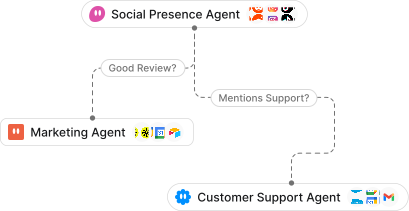
A canvas to orchestrate
multi-agent workflows
Memory that cites its sources
- Q3 roadmap: SSO by October, per the QBR deckDrive
- Acme asked for a dedicated Slack channelNotion
- Renewal at $48k, flagged as at riskHubSpot
Describe the agent. Spinrun publishes it.
Every agent and workflow is one JSON document. Claude, Codex, Cursor or the CLI reads it, changes it and puts it back — every reference checked before anything is written, published as you.
Make an agent that triages new Linear bugs every weekday morning and posts a summary to #eng.
Drafted Bug triage. Publishing it to your workspace:
{
  "kind": "spinrun.agent/v1",
  "name": "Bug triage",
  "model": "claude-sonnet-5",
  "tools": { "apps": ["linear", "slack"], "connections": "all" },
  "schedule": { "cron": "0 9 * * 1-5", "prompt": "Triage overnight bugs." }
}
Published bug-triage v1 · applied: version, publish, schedule
Meet your agents where you work
Interact with agents like co-workers in Slack, WhatsApp, email — or pick up the phone.
Tag @Spinrun and ask.
TeamsSoonGmailSoon@Spinrun Compare this month's revenue to last quarter
@Spinrun Who are our top 3 most engaged customers?
@Spinrun Where are we losing users in onboarding?
Not a script. Not a chatbot.
Cron jobs need a maintainer and a coding agent on a laptop needs a babysitter. A Spinrun agent runs unattended, inside the rules the workspace set.
| Scripts and cron | A coding agent on a laptop | Spinrun Agents | |
|---|---|---|---|
| Nothing to install | a server to keep | a laptop to keep open | runs in the browser |
| Runs unattended | schedules and triggers | ||
| Human approval gates | Partlyper prompt | an approvals inbox | |
| Every call logged | at the gateway | ||
| Any model, swap freely | |||
| 1,000+ apps, OAuth handled | you wire each one | Partlykeys in config files | through Spinrun Connect |
| Team roles and shared spaces | |||
| Who maintains it | You | You | We do |
Same gateway, same rules, same log
Every tool call an agent makes goes through Spinrun Connect. Read, write and destructive rules are checked on each call, credentials stay in the vault, and the activity log is the one the rest of the workspace already reads. How Spinrun Connect works →
- GDPR
A Romanian company under the GDPR and ANSPDCP, with a DPA that binds on acceptance and a countersigned copy on request.
- EU AI Act aligned
Human oversight at the gateway, transparency duties named, no conformity claim we cannot back.
- Core data hosted in Frankfurt, EU
Database, authentication and application functions run in Frankfurt. What is not region-pinned, we say so.
- No training on your data
Neither we nor the model providers we route through may train on your content.
- SCCs for non-EEA transfers
Standard Contractual Clauses, with encryption and access control behind them, wherever data leaves the EEA.
Start free. Pay for the work, not the seats.
Agents meter the tool calls they make against a monthly credit pool. Teammates watching them cost nothing, and nothing runs past the pool.
Frequently asked questions
Get started for free today.
Sign up and put the first agent to work in minutes, or talk to us about rolling agents out across a team.